
Online Cash Register + EWallet
Digital Tools Built for Elementary School Holiday Shops
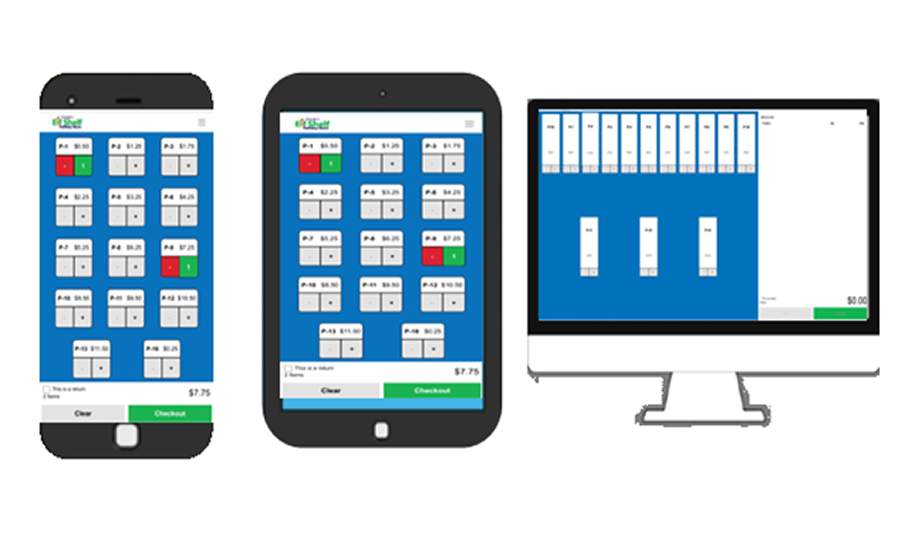
Natalie’s Holiday Shops includes an easy-to-use online cash register system and eWallet program to simplify transactions, reduce errors, and eliminate manual tracking. This system is built specifically for elementary school holiday shops and volunteer-led events.
Digital Tools
Login to Online Cash Register
Natalie's Holiday Shops will e-mail you login information 1 month before your store starts. Please see frequently asked questions below!
Key Features
Checkout & Payments
- Fast checkout and returns
- Accepts Cash, Check, eWallet, and Credit Cards
- Split payment options compatible across all devices
- Share the Joy Fund
User & Staff Management
-
Add and manage multiple cashiers
- Compatible with all devices, including desktops, laptops, tablets, and phones.
- All-in-One Dashboard
Reporting & Tracking
- Detailed sales reports
- Track eWallet sales and redeemed eWallets
Dashboard/Support
- Training Videos on Dashboard
- Place Reorder from Dashboard
- Print UPS return shipping labels directly from your dashboard.
- Submit damaged merchandise reports
- Automative Invoicing - Can pay online via ACH or Mail in by check.
Industry-Leading Technology
Everything You Need to Run a Successful Holiday Shop—All in One Dashboard
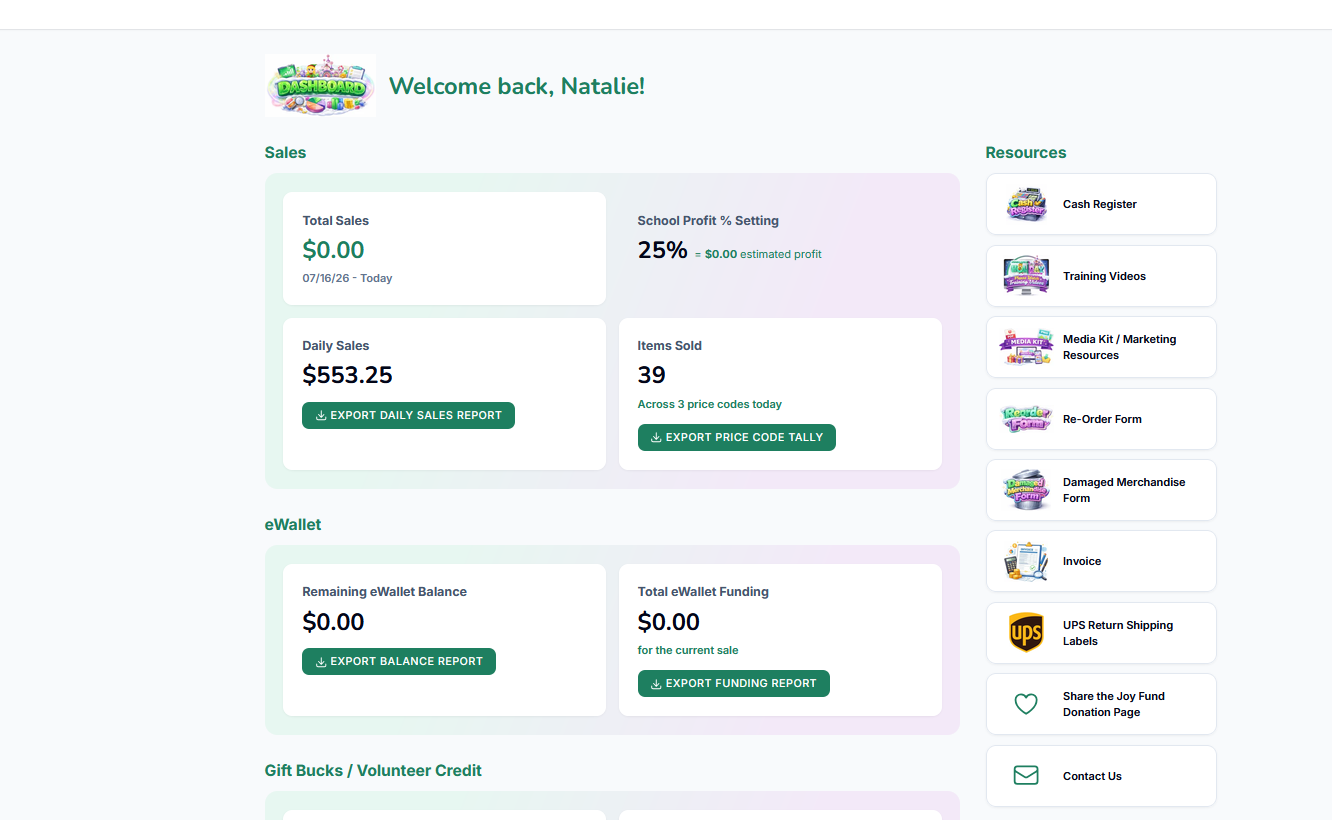
Manage your holiday shop with confidence using our secure, easy-to-use online dashboard. Access everything you need in one place, including training videos, the Chairperson Manual, marketing media kits, reorder forms, UPS return shipping labels, damaged merchandise reporting, automated invoicing, sales reports, eWallet reports, and account management tools. Available 24/7 from your desktop, laptop, tablet, or smartphone.
-
Training Videos
- Chairperson Manual
- Marketing Media Kit
- Reorder Form Submission
- UPS Return Shipping Labels/Schedule UPS Pickup
- Damaged merchandise Report Submission
- Automated Invoicing
- Online ACH Payments
- Sales Reports
- eWallet Reports
- Secure 24/7 Account Access
Frequently Asked Questions
Do we have to download an app?
No! All you have to do is visit https://app.nataliesholidayshop.com/login and login to the online cash register. Login information will be provided 1 month before the store starts.
Does the online register work on all devices?
Do we have to provide our own device?
Do we have login information?
Can we track redeemed eWallets?
Can we add multiple cashiers?
Yes, you can add as many cashiers as you’d like. Once added, they will receive an email with step-by-step instructions on how to log in.
One of Natalie’s Holiday Shop favorite features is the ability to assign different roles to volunteers. For example, a chairperson can be set as an Administrator with access to everything, while a new volunteer can be assigned strictly as a Cashier, limiting their access so they cannot view any back-end information.
What forms of payment can we take?
We accept cash, checks, eWallet, and credit cards.
If paying by check, please make all checks payable to your school.
Is the process fast to check students out through the online register?
Can we see our total sales?
Can we make returns through the online register?
If we choose a certain percentage, is it automatically set in the online register?
Yes, the percentage you selected when you signed up for 2026 will already be set in your online cash register. You can also verify this in the back end of your register.
Does it take internet/WiFi to run the online cash register?
Do you offer WiFi Packs?
Yes, we do offer Verizon Wi-Fi packs if your school has poor internet service and needs one. Please request a Wi-Fi pack when you sign up for 2026.
The Wi-Fi pack can run multiple devices and covers up to 1,500 sq. ft. A $50 fee will be added to your invoice at the end of the store for the Wi-Fi pack.
Wi-Fi packs are shipped with the store, and a return shipping label will be provided.
Can we place re-stock orders through the online register?
How do we get our invoice through the online register?
Yes! Once you have completed your Holiday Shop, you will click the Invoice icon on your dashboard and walk through the steps to finalize and generate your invoice.
Your invoice will provide a full breakdown of your sales, including cash sales, eWallet sales, credit card sales, and any other applicable credits or payments.
Once your invoice is finalized, you can either pay it online or mail us a check—whichever option works best for your school.
Can We Access Our UPS Shipping Labels Through the Online Register?
Yes! We have already pre-uploaded your UPS return shipping labels to your dashboard.
When you log in to the Online Register System, go to your dashboard and click the UPS Shipping & Schedule Pickup icon.
From there, you can print only the number of UPS labels you need. For example, if you have 4 boxes to return, print 4 shipping labels—one label for each box.
There is also a section for you to fill out the date you need UPS to come to the school to pick your remaining boxes up. We ask you set them in the front office of the school.
Is there a way for parents, businesses, or community members to help students who may need shopping assistance?
Do you have detailed reports?
Yes, we offer multiple reports within the register system to help you track your Holiday Shop throughout the event.
- Daily Sales Report
This report shows your total sales at any time and breaks them down by each payment method, including cash, eWallet, credit card, Gift Bucks, Volunteer Credit, and more. - Tally Report
This report shows how much merchandise you have sold within each price category, making it easy to see which price points are selling the most. - eWallet Funding Report
This report shows every student who has had money added to their eWallet account, along with their funding information. - eWallet Balance Report
This report shows the remaining balance for each student’s eWallet account, making it easy to identify students who still have money available to spend before the Holiday Shop closes. - Share the Joy Fund Report
This report shows all donations that have been made to your school’s Share the Joy Fund, so you can easily keep track of the funds available to help students in need.
Digital Tools
What is eWallet? Cashless Shopping for Your School Holiday Shop
Key Features
Parent eWallet Experience
-
Dedicated parent eWallet portal
-
Automated email reminders for remaining eWallet balances
How do we let our parents know about eWallet?
The eWallet form is printed on the back of the Parent Letter we provide. This letter is sent home with every student along with their Gift Guide Envelope.
The eWallet Parent Letter includes step-by-step instructions for parents on how to add funds to their child’s eWallet for the Holiday Shop.
Once funds have been added, the parent will fill out the Gift Guide Envelope and return it to school with their child. They will:
- Check the eWallet payment option
- Write the amount added
- Include their child’s name
- Write their eWallet code
No worries if a student forgets their envelope or eWallet information! Volunteers can look up the student through the back end of our Online Cash Register and verify their eWallet and available balance.
This makes it easy for students to shop even if they forget to bring their eWallet information with them.
How do parents/guardians upload funds to their child eWallet account?
Creating an eWallet is SUPER EASY & FAST!
Parents and guardians can visit https://app.nataliesholidayshop.com/login to create an account and upload funds for their child.
Have more than one child? No problem! Whether your children attend the same school or even different schools, you can manage all of their eWallets from one parent account.
Simply click “Add Child” from your Parent Portal dashboard to add another child.
Once your account is created, you can log in to your Parent Portal at any time to:
- Add additional funds
- Add or manage multiple children
- Edit or update your account information
- View how much your child has spent
- Manage each child’s eWallet—all in one convenient place!
It’s designed to make eWallet quick, simple, and convenient for families!
eWallet Balance & Refund Policy
eWallet Remaining Balance & Refund Policy
Any eWallet balance remaining at the end of the shop will be donated back to the school at 100% of the remaining balance.
Our school volunteers work very hard to help students spend all of the funds available in their eWallet. However, occasionally a small balance—typically around $0.50 to $1.00—may remain after a student finishes shopping. Any remaining funds will be donated directly back to the school.
We ask families to encourage each child to spend their entire eWallet balance while shopping. This policy will also be communicated to each school before their Natalie’s Holiday Shop opens.
Our online cash register allows us to see which students still have an available eWallet balance. We ask school volunteers to help students use their remaining funds whenever possible before the shop closes.
Refunds
We understand that there may be circumstances when a refund is needed. Parents or guardians may request a refund if:
- Their child was sick or absent and did not have the opportunity to shop, or
- They are dissatisfied with an item purchased.
To request a refund only if your child was sick or absent for the entire week and did not have the opportunity to participate in the shop, please email support@nataliesholidayshop.com.
Please include the following information in your email:
- Child’s full name
- School name
- Cardholder’s name
- Reason for requesting the refund
Once we receive your request, our team will be happy to review it and assist you.
Please remember: Natalie’s Holiday Shop is a seasonal program that visits each school only once per year. Because of this, refunds are limited to the circumstances listed above.
Our goal is to make sure students have the opportunity to enjoy the full holiday shopping experience while also ensuring that any small unused balances go right back to supporting their school. ❤️
Does the parents get a receipt after they upload funds with eWallet?
Do parents have their own eWallet portal?
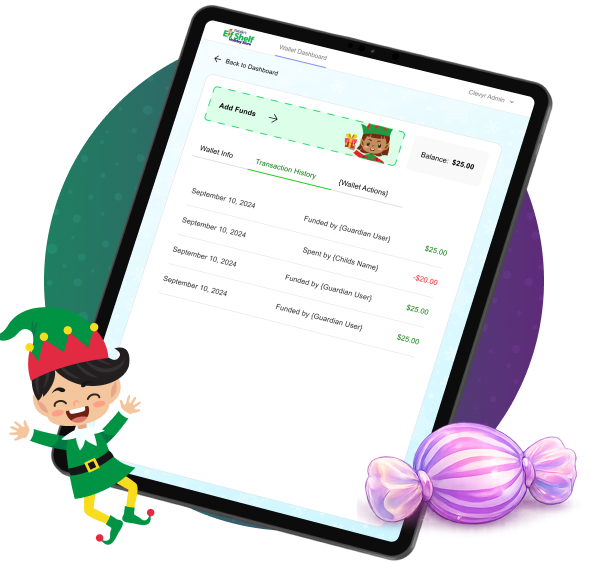
Yes! When parents/guardians create an eWallet account, they will have access to their own parent portal. From there, they can add funds, manage their account, and make any necessary updates or edits.
Parents will also be able to see how much their child spent. However, we intentionally do not show the specific items purchased. Since the children are shopping for gifts for their family members, we want to help keep those purchases a special surprise for everyone to open during the holidays! 🎁
Is the eWallet free to the school?
Does the Chairperson have Access to the Reports?
The chairperson can view all transactions through the online cash register.
Login information will be emailed to the chairperson one month prior to the store opening.
eWallet Report includes:
-
Student Name
-
Grade
-
Teacher
-
Supporter Name (parent/guardian who uploaded funds)
-
Amount Added ($)
-
Time and Date
-
eWallet ID Code
-
Amount Redeemed
-
Remaining Balance
Do we have to offer eWallet?
Do you offer WiFi Packs?
Yes, we do offer Verizon WiFi packs. If your school has poor internet service and needs one.
Please request for one when you sign up for 2026. There will be a $50 fee added to your invoice at the end of the store for the WiFi Pack. WiFi Packs are shipped with the store and a return shipping label will be provided.
How Share the Joy Fund Works
Key Features
-
Parents can choose to donate any amount to the Share the Joy Fund when adding money to their child's eWallet.
-
Funds are used to provide shopping opportunities for students who may not otherwise be able to participate in the holiday shop.
-
Schools can view the current Share the Joy Fund balance at any time directly from their Register Dashboard.
- Encourages families, PTOs, staff, and community members to come together to ensure every child experiences the joy of holiday shopping.
-
Schools can share the Share the Joy Fund through social media, newsletters, websites, and email campaigns to increase awareness and participation.
-
Any unused Share the Joy Fund balance at the end of the holiday shop is donated back to the school.
-
Helps ensure that every child has the opportunity to shop for family and friends regardless of financial circumstances.
Share the Joy Fund
What is the Share the Joy Fund?
The Share the Joy Fund allows families to make an optional donation when adding eWallet funds for their child. These donations are combined into a dedicated fund that helps provide shopping opportunities for students who may not otherwise be able to participate.
How It Works
- Parents add funds to their child's eWallet.
- During checkout, parents can choose to contribute any amount to the Share the Joy Fund. (of course they do not have to-- this is only an option)
- All donations are collected in a separate fund designated specifically for the school.
- School administrators can view the current Share the Joy Fund balance at any time from their Register Dashboard.
- Schools can promote the Share the Joy Fund through social media, newsletters, and other communications to encourage community participation.
Supporting Students
Schools may use Share the Joy Fund donations to provide shopping funds for students who need financial assistance, helping ensure every child can enjoy the holiday shopping experience.
What Happens to Unused Funds?
Any funds remaining in the Share the Joy Fund after the event will be donated back to the school. These funds will never be retained by Natalie's Holiday Shop and will continue to benefit the school's students and program.
Together, we can share the joy and help make the holiday season special for every child. 🎁✨